
Settings
Open Settings from the row at the bottom of the sidebar. On a Mac it also opens in its own window with ⌘,; on iPad the sidebar row presents it as a sheet.
Settings are stored on the device. None of them sync through iCloud.
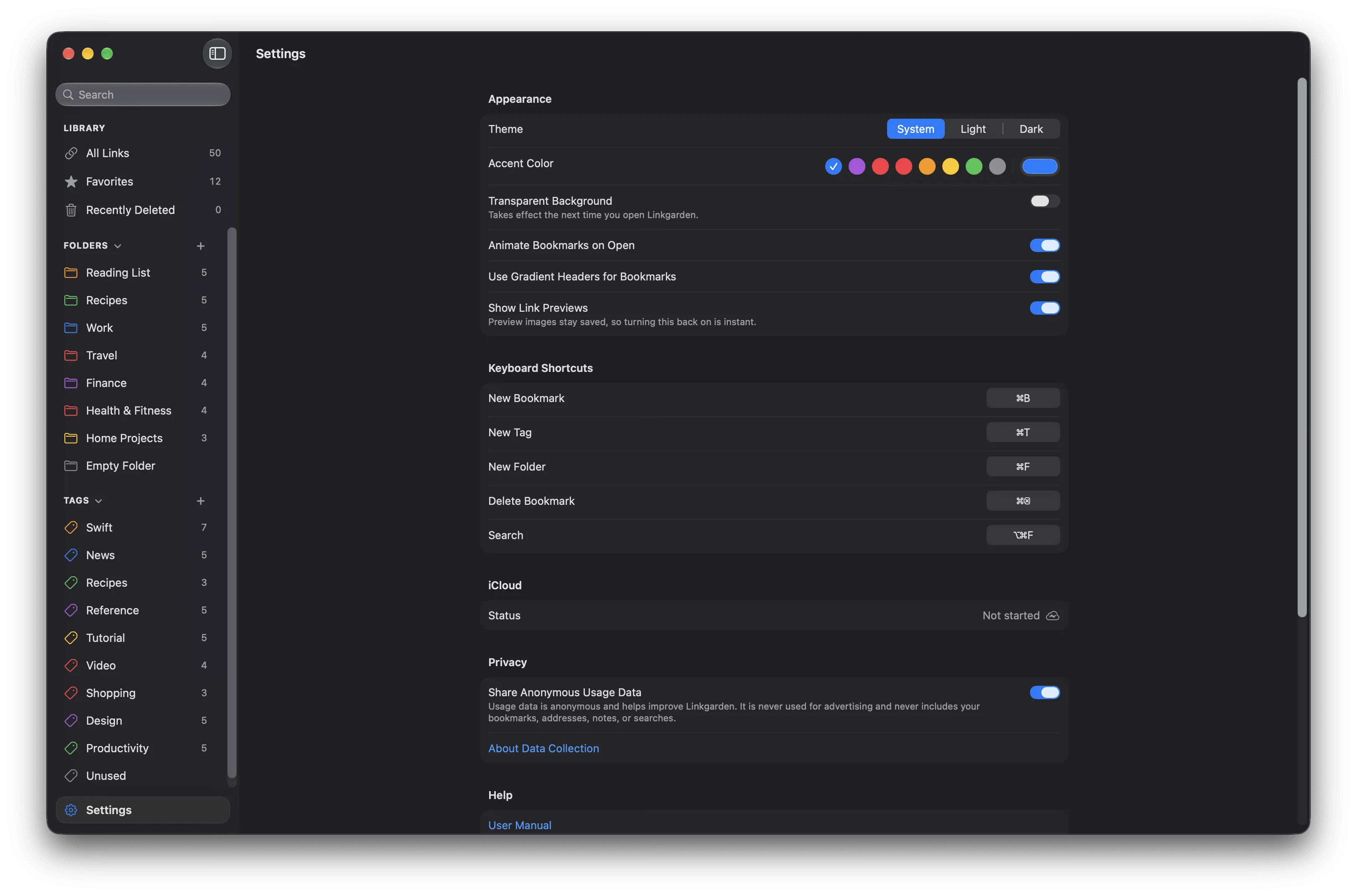
Settings shown in the main window on a Mac.
Appearance
Section titled “Appearance”| Setting | Values | Default | Platform | Takes effect |
|---|---|---|---|---|
| Theme | System, Light, Dark | System | Both | Immediately |
| Accent Color | 8 presets, or any custom colour | #007AFF (blue) |
Both | Immediately |
| Transparent Background | On / Off | Off | macOS only | Next launch |
| Animate Bookmarks on Open | On / Off | On | Both | Immediately |
| Use Gradient Headers for Bookmarks | On / Off | On | Both | Immediately |
Theme sets the app’s colour scheme and, on a Mac, the window chrome. System follows the device.
Accent Color offers Blue, Purple, Pink, Red, Orange, Yellow, Green, and Graphite as swatches, plus a colour well for anything else. It is the same palette used for folder and tag colours.
Transparent Background makes the window translucent. Its subtitle reads “Takes effect the next time you open Linkgarden.”
Animate Bookmarks on Open staggers the appearance of bookmarks when a section opens. The animation is skipped regardless of this setting when Reduce Motion is on in system accessibility settings.
Use Gradient Headers for Bookmarks fills a bookmark’s icon tile and grid-card header with a gradient derived from its folder and tag colours. Off gives a plain neutral fill.
Browser
Section titled “Browser”macOS only.
| Setting | Values | Default | Platform | Takes effect |
|---|---|---|---|---|
| Open Links In | System Default, or any installed browser | System Default | macOS only | Immediately |
Open Links In lists the browsers installed on your Mac, sorted by name. It chooses where a bookmark’s Open Link button and its Open Link context-menu item open the page. System Default hands the link to your Mac’s default browser. If the browser you picked is later uninstalled, the setting returns to System Default the next time you open Settings, and links open in the default browser in the meantime.
On iPad, links always open in the system default browser.
Keyboard Shortcuts
Section titled “Keyboard Shortcuts”macOS only. Five reassignable commands, each with a recorder button and — once changed — a Reset button.
| Command | Default |
|---|---|
| New Bookmark | ⌘B |
| New Tag | ⌘T |
| New Folder | ⌘F |
| Delete Bookmark | ⌘⌫ |
| Search | ⌥⌘F |
See Customise keyboard shortcuts.
iCloud
Section titled “iCloud”A read-only Status row showing the current sync state, with a matching symbol.
| Status | Meaning |
|---|---|
| Synced with iCloud | The last sync completed. |
| Syncing… | A sync is in progress. |
| Not syncing | No sync is currently running. |
| Not started | Sync has not begun yet this session. |
| No network | The device has no network connection. |
| No iCloud account | No iCloud account is available on this device. |
| Sync error | Sync failed, or its state could not be determined. |
If Linkgarden could not reach the storage it shares with the Safari extension, a red caption appears below the status: “Safari saving is unavailable.” The app still works normally; only the extension’s saving is affected.
Privacy
Section titled “Privacy”| Setting | Values | Default | Platform | Takes effect |
|---|---|---|---|---|
| Share Anonymous Usage Data | On / Off | On | Both | Immediately |
Share Anonymous Usage Data controls whether Linkgarden sends anonymous product analytics. It is anonymous, never used for advertising, and used only to improve the app. Turning it off stops collection immediately, with no relaunch needed. An About Data Collection link sits below the toggle, pointing to What leaves your device.
Demo Mode
Section titled “Demo Mode”When available, a Demo Mode toggle replaces your library with sample data on the next launch. Its subtitle reads “Takes effect the next time you open Linkgarden.” While it is running, a caption reads: “Showing demo data. Your real bookmarks are untouched and nothing here syncs to iCloud.”
Demo data is held in memory only, never written to disk, and never uploaded to iCloud.